01 — hero
Free Chrome extension For Webflow CMS & Designer
Tables in Webflow rich text. Finally.
Webflow's rich text element has no table option. Table Builder adds one — right in the + menu — with a visual designer, responsive layouts and clean code. No generators. No pasting raw HTML.
Works in Chrome, Edge, Brave & Arc · No sign-up · No data collected · Not on Webflow? Use the free online table generator
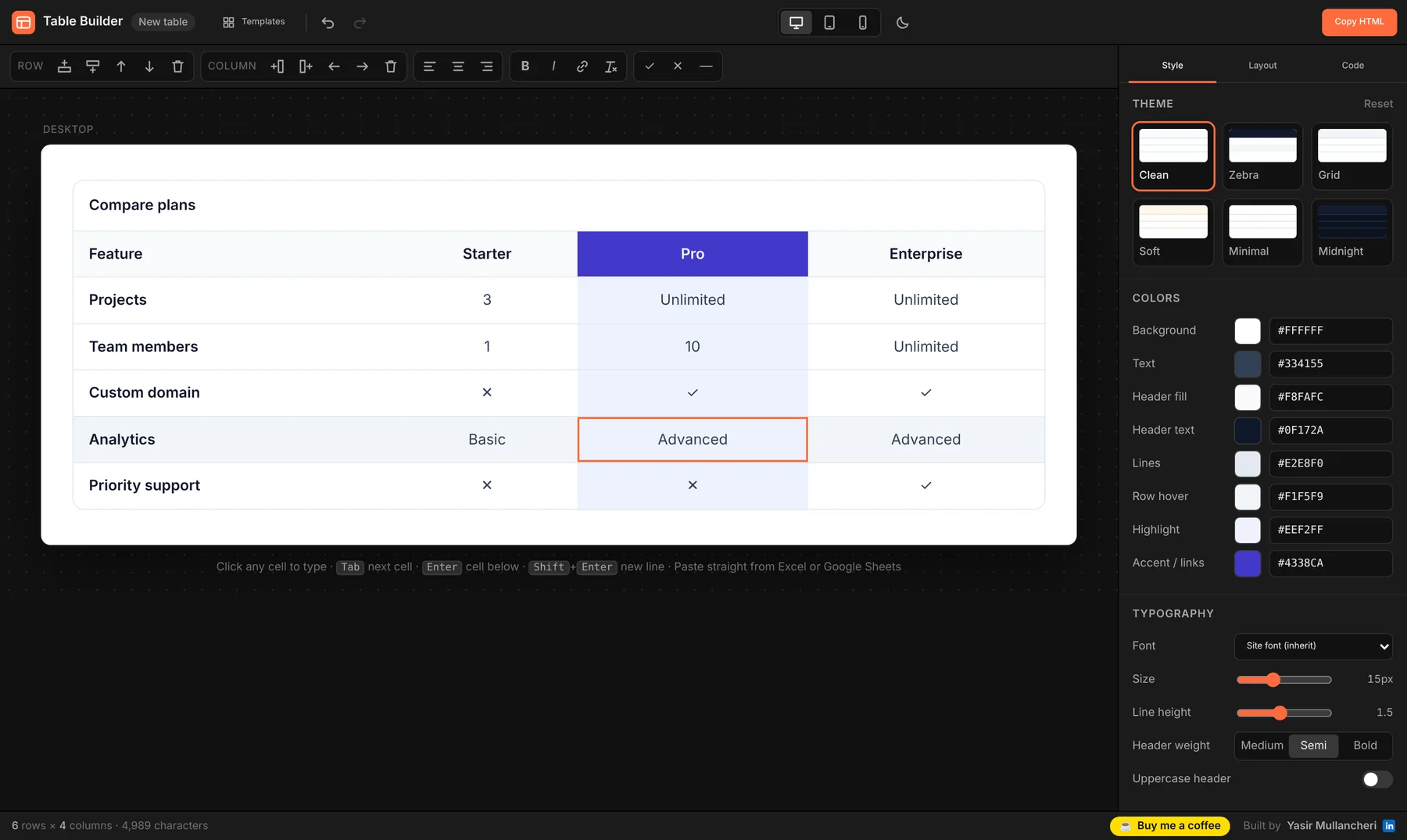
- Themes
- 6
- Mobile layouts
- 3
- Scripts on your site
- 0
- Price
- Free
02 — the problem
Why I built it
Every Webflow dev has a table workaround. None of them are fun.
Before
- 01Open an online table generator
- 02Rebuild the table, copy the HTML
- 03Add an embed, paste, write CSS
- 04Check mobile. It overflows.
- 05Client asks for one change. Start again.
~15 minutes per table
With Table Builder
- 01Click + → Table in rich text
- 02Type or paste from Google Sheets
- 03Pick a theme, choose a mobile layout
- 04Click Insert
- 05Need a change? Open the embed → Edit visually
About a minute
03 — how it works
How it works
Four steps, all inside Webflow.
- 01 — Insert
Click + → Table
In any Rich Text field — CMS item or Designer — the Table option sits right next to HTML embed.
- 02 — Fill
Type like a spreadsheet
Tab and Enter move between cells. Paste a range from Excel or Google Sheets and it fills in.
- 03 — Style
Make it yours
Themes, colours, fonts, padding, borders, stripes, a highlighted column, and how it behaves on mobile.
- 04 — Done
Insert & edit later
The table drops into an HTML embed for you. To change it, open the embed's code and click Edit visually.
04 — live demo
Real output Drag the slider
Desktop table. Mobile cards. Same code.
This is an actual table exported from Table Builder — plain HTML and CSS, no JavaScript. Shrink the container and watch each row turn into a labelled card.
| Feature | Starter | Pro | Enterprise |
|---|---|---|---|
| Projects | 3 | Unlimited | Unlimited |
| Team members | 1 | 10 | Unlimited |
| Custom domain | ✕ | ✓ | ✓ |
| Analytics | Basic | Advanced | Advanced |
| Priority support | ✕ | ✕ | ✓ |
Cards switch on below 600px of container width — not screen width — so the table adapts whether it sits in a full-width blog post or a narrow column.
05 — features
Features
Everything a table needs. Nothing your site doesn't.
Spreadsheet editing
Keyboard navigation, paste from Sheets or Excel, CSV import, add and reorder rows and columns.
6 themes + full control
Clean, Zebra, Grid, Soft, Minimal, Midnight — then tweak colours, font, size, padding, borders and corners.
Responsive, your way
Horizontal scroll with a sticky first column, stacked mobile cards, or squeeze to fit.
Clean HTML + CSS
Scoped styles, no scripts, no external files. Nothing extra loads on your published site.
Edit anytime
Open a table's embed code and click Edit visually — it reopens in the visual editor, not raw code.
Accessible markup
Real header cells with scope, captions, and keyboard-scrollable regions for screen readers.
Pricing-ready
Highlight a column, add a footer row, use ✓ ✕ symbols — comparison and pricing tables in seconds.
Device preview
Check desktop, tablet and mobile — and a dark page — before you insert.
Templates
Start from feature comparison, pricing, specifications or schedule — or a blank table.
06 — install
Get started
Install in 10 seconds.
From the Chrome Web Store
- Click Add to Chrome below.
- Reload any open Webflow tab.
- Open a Rich Text field → + → Table.
Works in
Any Chromium browser that supports Chrome Web Store extensions.
Works with the Webflow CMS Editor and the Designer. Any Webflow plan that allows embeds.
07 — faq
FAQ
Questions, answered.
Is it really free?
Yes. No paid plan, no locked features, no account. If it saves you time, you can support it with a coffee — totally optional.
Does it add JavaScript to my published site?
No. Each table is plain HTML with its own scoped CSS, placed in a standard Webflow HTML embed. Nothing else loads on your live site, and it keeps working even if you uninstall the extension.
Can I edit a table after inserting it?
Yes. In the rich text field, click the table's embed, open its code with the </> icon, and click Edit visually. It reopens in the visual editor with all your content and styling — click Update table to save it back.
How do the mobile layouts work?
Choose Scroll (swipe sideways, optional sticky first column), Cards (each row becomes a labelled card) or Squeeze (columns shrink and text wraps). Layouts respond to the width of the container the table sits in, using CSS container queries.
Is there a size limit?
Webflow embeds allow up to 50,000 characters. The builder shows a live character count so you know how much room you have — a typical 6 × 4 table uses around 5,000.
What data does the extension collect?
None. Everything runs in your browser, and only your last-used table style is saved locally. Read the privacy policy.
It didn't insert automatically — what now?
Webflow updates its interface from time to time. If automatic insert ever misses, the table HTML is already on your clipboard: add an HTML embed, paste and save. First try reloading the Webflow tab — see the troubleshooting guide. Still stuck? Let me know on LinkedIn and I'll ship a fix.
08 — support
Made in Kerala by Yasir Mullancheri
Built by a Webflow developer, for Webflow developers.
Table Builder is free and always will be. If it saved you an afternoon of fighting HTML, you can fuel the next update.