tool — html table generator
Free tool No sign-up · No watermark · Autosaves
Free HTML table generator, made for real websites.
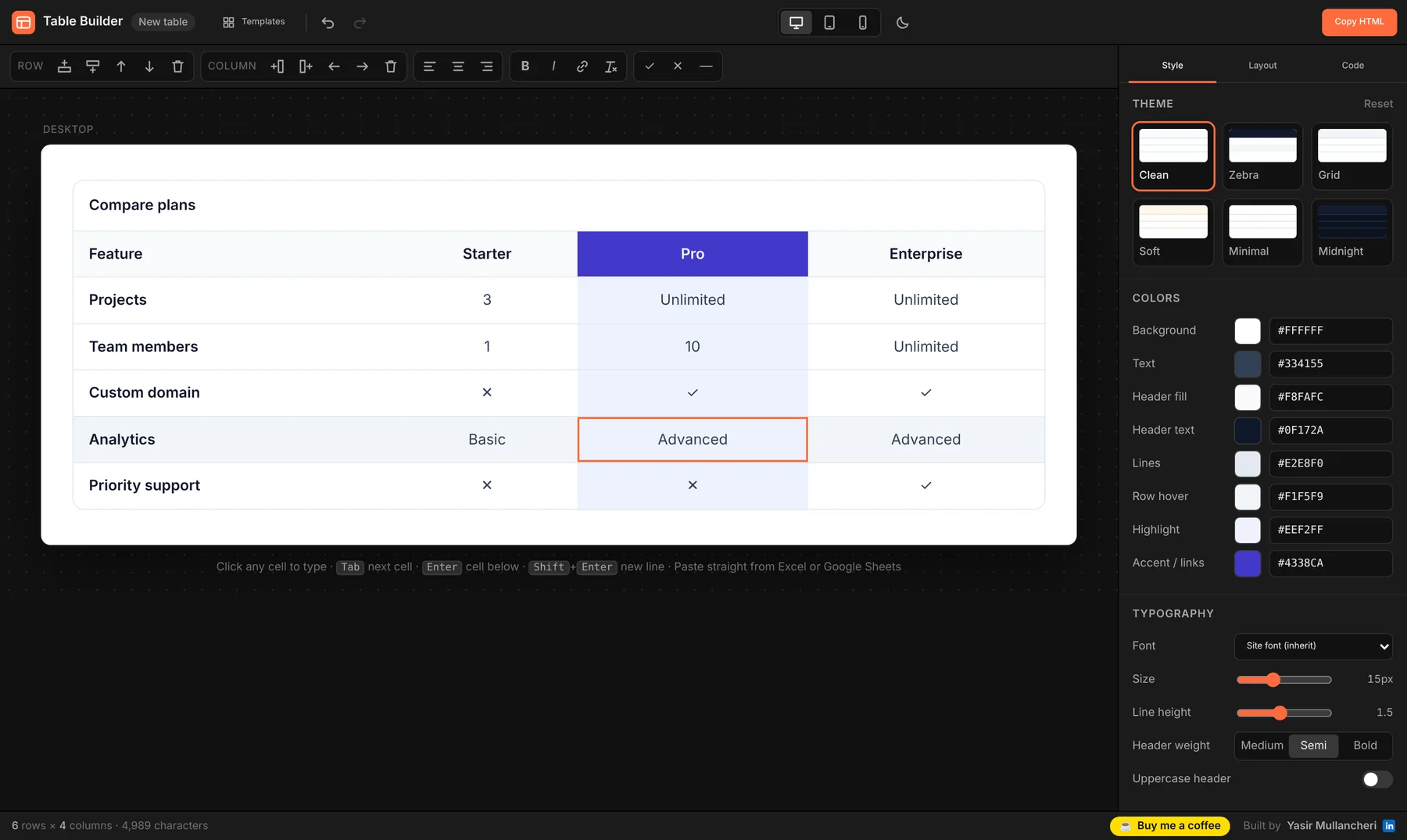
Design a styled, responsive table visually — paste from Excel or Google Sheets, pick a theme, choose how it looks on mobile — then copy clean HTML + CSS into WordPress, Webflow, Shopify or any site.
The editor needs a bit of room — it opens full screen on phones. For the best experience, use a laptop or tablet.
01 — how it works
How to make an HTML table
Four steps, no code.
- 01 — Fill
Add your data
Type into the cells, or paste a range straight from Excel or Google Sheets. Start from a template if you like.
- 02 — Style
Make it look right
Pick a theme, then adjust colours, font, borders, spacing, stripes and corners. Highlight a column for pricing tables.
- 03 — Mobile
Choose the mobile layout
Scroll, stacked cards or squeeze. Preview it on desktop, tablet and phone sizes.
- 04 — Copy
Paste it into your site
Click Copy HTML (or Download .html) and paste into any HTML block on WordPress, Webflow, Shopify and more.
02 — features
Features
Everything a table needs. Nothing your site doesn't.
Spreadsheet-style editing
Tab and Enter navigation, paste from Sheets or Excel, CSV import, add, delete and reorder rows and columns.
6 themes + full control
Clean, Zebra, Grid, Soft, Minimal and Midnight — then fine-tune every colour, font size and spacing.
Responsive by default
Horizontal scroll with sticky first column, stacked mobile cards, or squeeze-to-fit.
Clean, scoped code
Plain HTML and CSS with no scripts. Styles are scoped so they never clash with your theme.
Pricing & comparison ready
Highlighted column, footer row, ✓ ✕ symbols, header column and captions built in.
Autosaves as you work
Your table is kept in your browser, so a refresh or closed tab won't lose your work.
Works with
03 — for webflow users
Free Chrome extension
On Webflow? Skip the copy-paste.
Table Builder for Webflow puts this same editor inside the CMS rich text + menu. Insert tables directly into blog posts and edit them later with one click.
04 — faq
FAQ
HTML table generator questions
Is this HTML table generator really free?
Yes. It's completely free, with no sign-up, no watermark and no limits. Your table and settings are saved in your own browser, nothing is uploaded.
How do I add the table to WordPress?
Click Copy HTML, then in the WordPress editor add a Custom HTML block and paste the code. It works the same in Classic Editor (Text tab), Elementor's HTML widget and most page builders.
Does it work with Webflow, Shopify, Wix and Squarespace?
Yes. Paste the code into Webflow's Embed / HTML embed, Shopify's Custom Liquid or HTML section, Wix's Embed HTML element, or Squarespace's Code block. If you use Webflow every day, the free Chrome extension adds a Table button right inside the CMS rich text editor.
Will the table work on mobile?
Yes. In the Layout tab choose how it behaves on small screens: scroll sideways (with an optional sticky first column), stack every row into a labelled card, or squeeze the columns to fit. It adapts to the width of its container, not just the screen.
Does the code include JavaScript or tracking?
No. You get plain HTML with a small block of scoped CSS. The styles only apply to that one table, so they won't break the rest of your site.
Can I paste data from Excel or Google Sheets?
Yes. Copy a range of cells in Excel or Google Sheets, click into any cell in the generator and paste. Rows and columns are added automatically. You can also import a CSV file from the Code tab.
Can I edit a table I made earlier?
Yes. Your last table is restored automatically when you come back on the same browser. For any older table, open the Code tab, paste its HTML into Import and click Load table.
Is the table accessible and good for SEO?
Yes. It uses real HTML table markup with header cells, scope attributes and an optional caption, so screen readers and search engines can understand the data.
05 — need more?
Made by Yasir Mullancheri
Need the whole website, not just the table?
I design and build websites on Webflow and WordPress, and online stores on Shopify and WooCommerce. If this tool helped, you can also buy me a coffee ☕